Student Article
Your Dashboard
Learn how to make the most of your CPNW dashboard. This walkthrough highlights every section so you can keep compliance tasks on track and stay aware of upcoming deadlines.
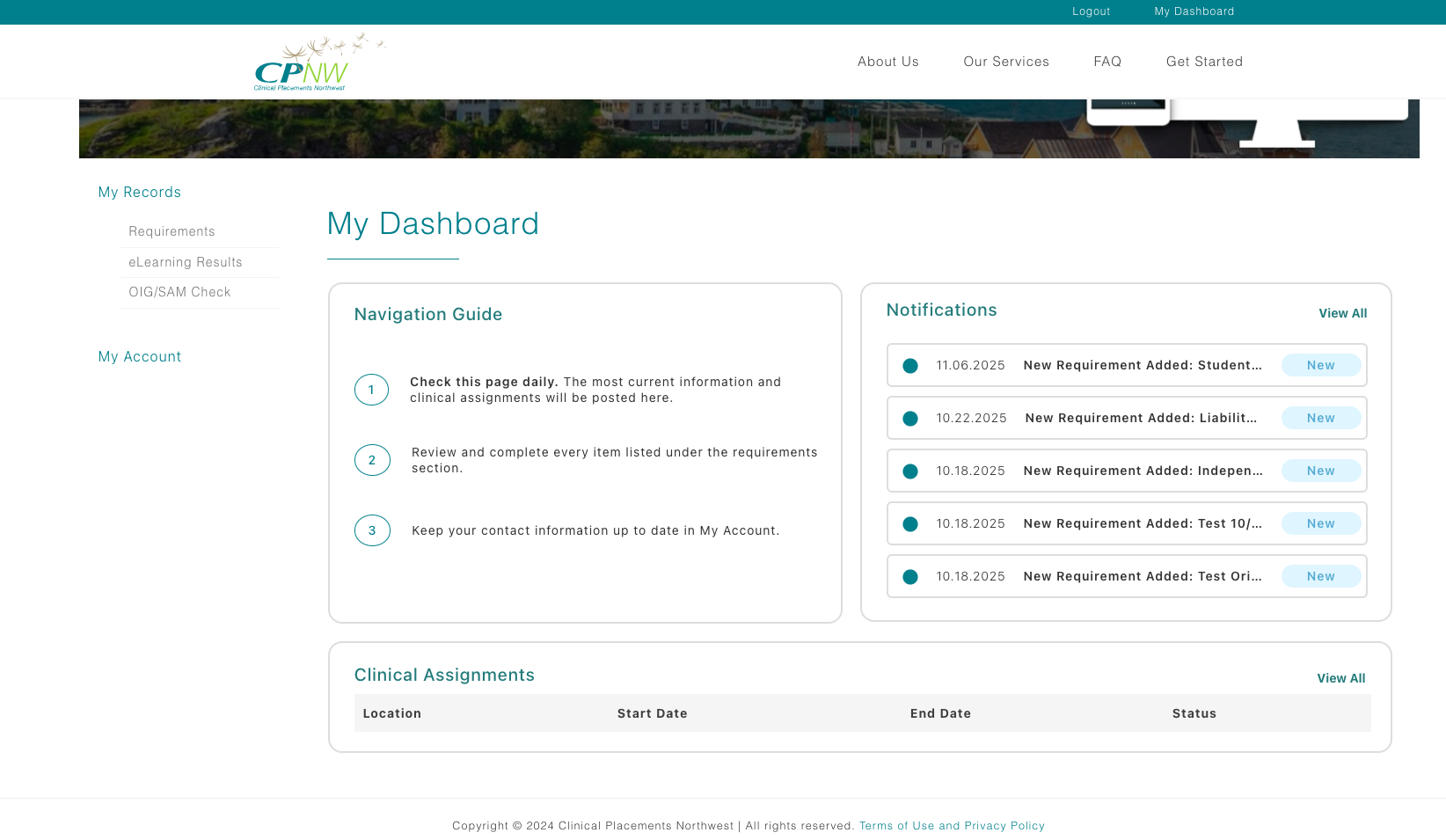
My Records menu
Look to the left side of the dashboard for the My Records tile. Selecting it reveals a compact menu so you can jump directly to the section you need. The links open in the same view, letting you stay oriented while you navigate the website.
- Requirements — Submit immunizations, eLearning modules, CPR cards, and any program- or facility-specific requirements.
- eLearning Results — See completion dates, scores, and download a PDF of your module results.
- OIG/SAM Check — Track the automated exclusion scan CPNW runs on the 1st and 15th of each month.
My Account menu
Directly below My Records you will see My Account. Selecting it expands a second menu for personal settings and profile updates:
- My Profile — Update your name, contact details, emergency contacts, and mailing address.
- My Security Settings — Change your password and manage two-factor authentication delivery.
- My Demographics — Upload a profile photo.
Notifications
On the right side of the dashboard, the Notifications panel keeps you informed without leaving the page. Each card highlights time-sensitive items:
- Alerts when new requirements are posted for your program or facility.
- Messages from coordinators or document reviewers, including follow-up questions.
- Status updates when pending requirements flip to approved or need a correction.
- Reminders as annual requirements approach expiration so you have time to renew.
Clinical assignments
At the bottom of the dashboard you'll find the clinical assignments table. Each row shows:
- The healthcare facility you are assigned to.
- Rotation start and end dates for quick reference.
- The assignment status (approved or rejected). A rejected status simply indicates an outstanding issue and will flip to approved once the issue is resolved.